We’ve all deleted something important and then needed it, or damaged our phone and lost crucial data. Unfortunately, sometimes this happens to our text messages, and if you’ve got an Android, it may be very difficult to get them back. Here's what you can attempt to salvage them, and more importantly, what you can do to keep it from happening again.
 Image: Android Authority
Once that’s done, you should check to see if the relevant data you need has already been kept elsewhere. For example, photos are sometimes automatically backed up to your phone’s Gallery app, and appointments are sometimes automatically added to your calendar. If there’s a relevant app for the information you need, check that first.
If you’re in regular contact with the person whose messages you lost, they may have the conversation backed up on their phone and can forward it to you. Just explain the situation and ask them to forward the relevant messages to you.
If all else fails, and you've backed up your phone completely before you deleted the messages using a full-phone SMS backup app such as SMS Backup & Restore or Ultimate Backup, or other such apps in Google Play you can try wiping and restoring your phone.
Here comes the main part, if the above steps don’t work, then there’s no easy way to restore the messages with software.
SEE ALSO: Top#3 Best New Features in Chrome 69 | 10th Anniversary Update
There are plenty of “Android data recovery” applications out there, from companies who aren’t affiliated with Google. While the quality of these applications varies widely depending on the company, there are a few consistent factors with these apps.
These softwares may be able to recover your text messages, among other deleted data, if the data hasn't already been overwritten. All these apps will do is find the data marked for deletion and you can decide to remove it or not.
In most of the cases, they require you to “root” your phone. Think of “root” as the person who has all the keys to a building and the permission to go anywhere and do anything in it. Rooting your phone will likely void the warranty on your phone and may cause other problems.
Lastly, you will have to pay for the software. So you have to weigh the value of retrieving your text messages against what you pay for the software, the risk of voiding your warranty, and the uncertain results.
If you do decide to go the software route, DiskDigger is a popular app that doesn’t require you to root your phone, although that may limit the software’s effect. But whether you go to software, or simply ask for a new text, this is one case where an ounce of prevention is worth a pound of cure.
SEE ALSO: How to Identify Unknown Numbers on WhatsApp/Viber/Telegram/Line?
Once Google Drive is downloaded, open it, sign in if you need to use the name and password you use for your Gmail if necessary, and click the three lines in the upper left-hand corner. Then choose settings, and select “Google Backup.”

This will open a menu, and then select “SMS messages.” If Google Drive came pre-installed on your phone, it’ll already be backing up your messages, but otherwise, simply enable it and that will preserve texts. However, you won't have long; Google Drive updates its backup every 12 to 24 hours, so if a message is deleted, restore it immediately.
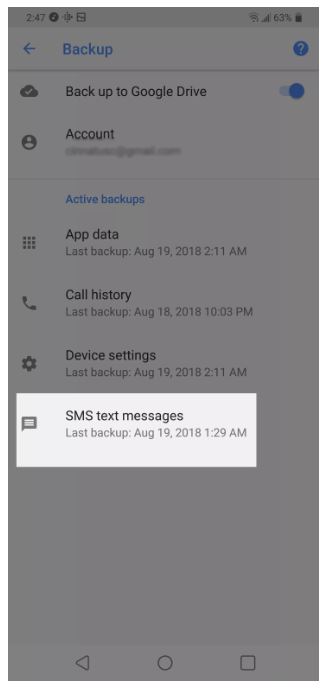
Unfortunately, this is an archive: It isn't searchable for one message and you can't restore just one. This will update your entire text history, all at once, to the previous setting. If there are any important messages you've gotten in the meantime, use the techniques below to preserve them.
If you really want to cover your bases, you can also screenshot important messages, which will be saved automatically by Google Photos. On any Android phone operating system 4.0 or above (which is almost any phone released since 2011), hold the power button and the volume down button at the same time, and it’ll snap a photo of your screen. It’s a “quick and dirty” way to back up important messages when you’re rushed for time, or only need to back up a handful of messages.
If you want a full-featured tool that doesn't involve messing with your phone, try Helium, which uses your desktop computer and can preserve specific messages, as well as data from your whole Android. There are other such apps available in Google Play Store so do read the reviews and ratings prior going for any app.
This ounce of prevention will go a long way towards preserving your text history and keeping the messages you want properly recorded. And it’ll also ensure you hang onto everything you snap.
Via Lifewire
READ NEXT: First Blogger (Blogspot) Google Adsense Earning (with PROOF)
Recover Deleted Texts From A Phone (Android)
When you delete something, Android marks it to be "overwritten" with new data. Think of it like erasing something from your to-do list with a pencil being able to write something new in the same space.Important Things to Do
First, you need to try and preserve the data. If you’ve just deleted the messages, put your phone into airplane mode immediately. This will shut off the Wi-Fi and the cellular radio so you won’t download any new information. You also shouldn’t use the camera, record audio, or otherwise create any new data that might potentially overwrite the messages. Image: Android AuthorityIf you’re in regular contact with the person whose messages you lost, they may have the conversation backed up on their phone and can forward it to you. Just explain the situation and ask them to forward the relevant messages to you.
If all else fails, and you've backed up your phone completely before you deleted the messages using a full-phone SMS backup app such as SMS Backup & Restore or Ultimate Backup, or other such apps in Google Play you can try wiping and restoring your phone.
Keep it in mind if you have already installed Apps like SMS Backup & Restore then it becomes really easy to recover deleted text from a phon.
Here comes the main part, if the above steps don’t work, then there’s no easy way to restore the messages with software.
SEE ALSO: Top#3 Best New Features in Chrome 69 | 10th Anniversary Update
(With Software) Recover Deleted Texts From A Phone
If wiping and restoring the phone is out of the question, you can turn to PC-based software.There are plenty of “Android data recovery” applications out there, from companies who aren’t affiliated with Google. While the quality of these applications varies widely depending on the company, there are a few consistent factors with these apps.
These softwares may be able to recover your text messages, among other deleted data, if the data hasn't already been overwritten. All these apps will do is find the data marked for deletion and you can decide to remove it or not.
In most of the cases, they require you to “root” your phone. Think of “root” as the person who has all the keys to a building and the permission to go anywhere and do anything in it. Rooting your phone will likely void the warranty on your phone and may cause other problems.
Lastly, you will have to pay for the software. So you have to weigh the value of retrieving your text messages against what you pay for the software, the risk of voiding your warranty, and the uncertain results.
If you do decide to go the software route, DiskDigger is a popular app that doesn’t require you to root your phone, although that may limit the software’s effect. But whether you go to software, or simply ask for a new text, this is one case where an ounce of prevention is worth a pound of cure.
SEE ALSO: How to Identify Unknown Numbers on WhatsApp/Viber/Telegram/Line?
Backing Up Your Messages
If you have a relatively new Android phone, backing up your text messages is simple. First, check to see if your phone has Google Drive installed. If not, you can find it in the Google Play store; open the store and search for “Google Drive.” It’ll be a free download. You can choose to buy more storage if you want, but it won’t be necessary for our purposes.Once Google Drive is downloaded, open it, sign in if you need to use the name and password you use for your Gmail if necessary, and click the three lines in the upper left-hand corner. Then choose settings, and select “Google Backup.”
Backing Up MMS and Photos
For multi-media messages, or MMS, such as photos, you’ll need to repeat this process with Google Photos, although that usually comes with your Android. However, the good news is that any photos you take, if you have Google Photos, backups have been enabled for years so you might be surprised what’s already stored on there. For photos that are sent to you, you may need to download a third-party app such as Save MMS, which will do it automatically.If you really want to cover your bases, you can also screenshot important messages, which will be saved automatically by Google Photos. On any Android phone operating system 4.0 or above (which is almost any phone released since 2011), hold the power button and the volume down button at the same time, and it’ll snap a photo of your screen. It’s a “quick and dirty” way to back up important messages when you’re rushed for time, or only need to back up a handful of messages.
If you want a full-featured tool that doesn't involve messing with your phone, try Helium, which uses your desktop computer and can preserve specific messages, as well as data from your whole Android. There are other such apps available in Google Play Store so do read the reviews and ratings prior going for any app.
This ounce of prevention will go a long way towards preserving your text history and keeping the messages you want properly recorded. And it’ll also ensure you hang onto everything you snap.
Via Lifewire
READ NEXT: First Blogger (Blogspot) Google Adsense Earning (with PROOF)
Nhận xét
Đăng nhận xét